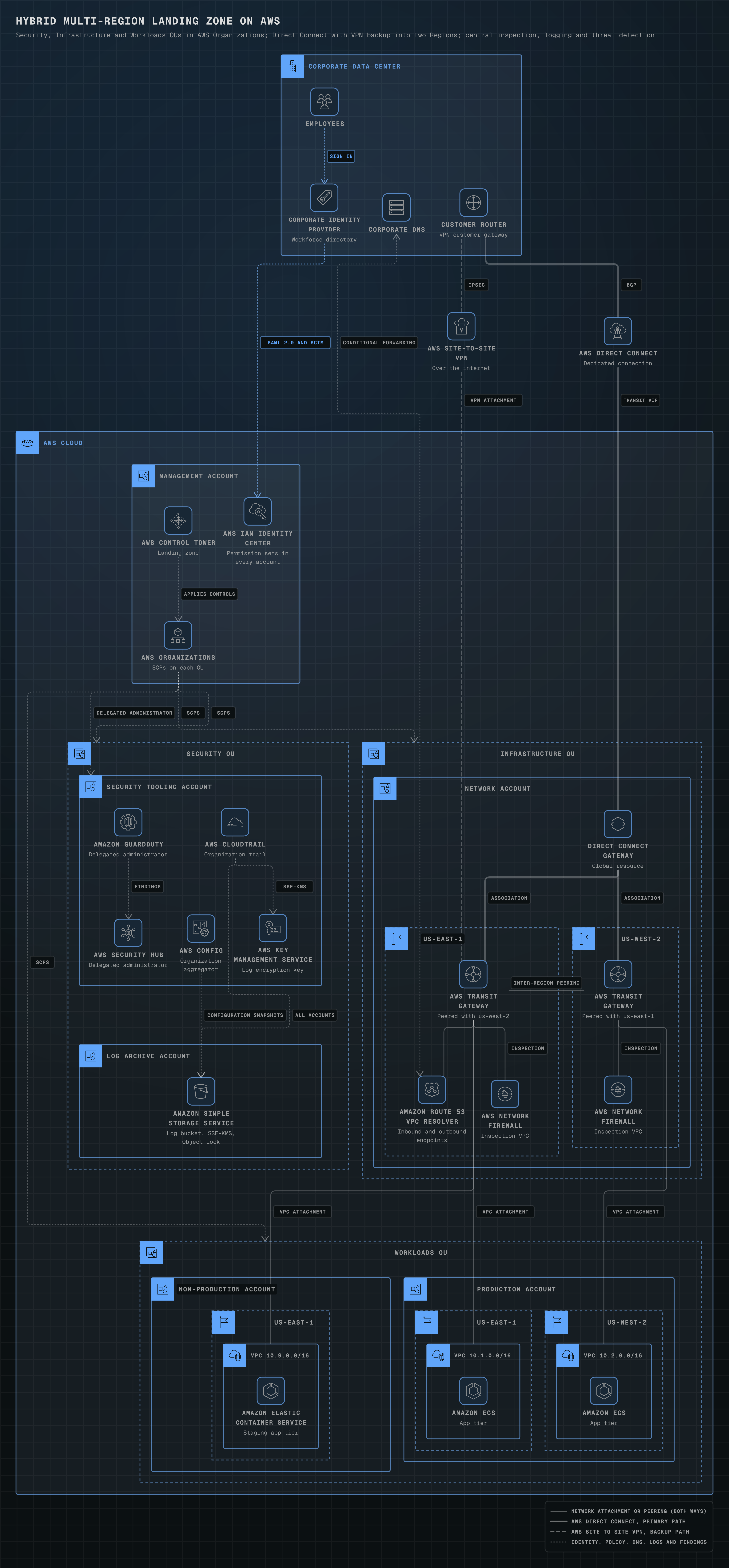
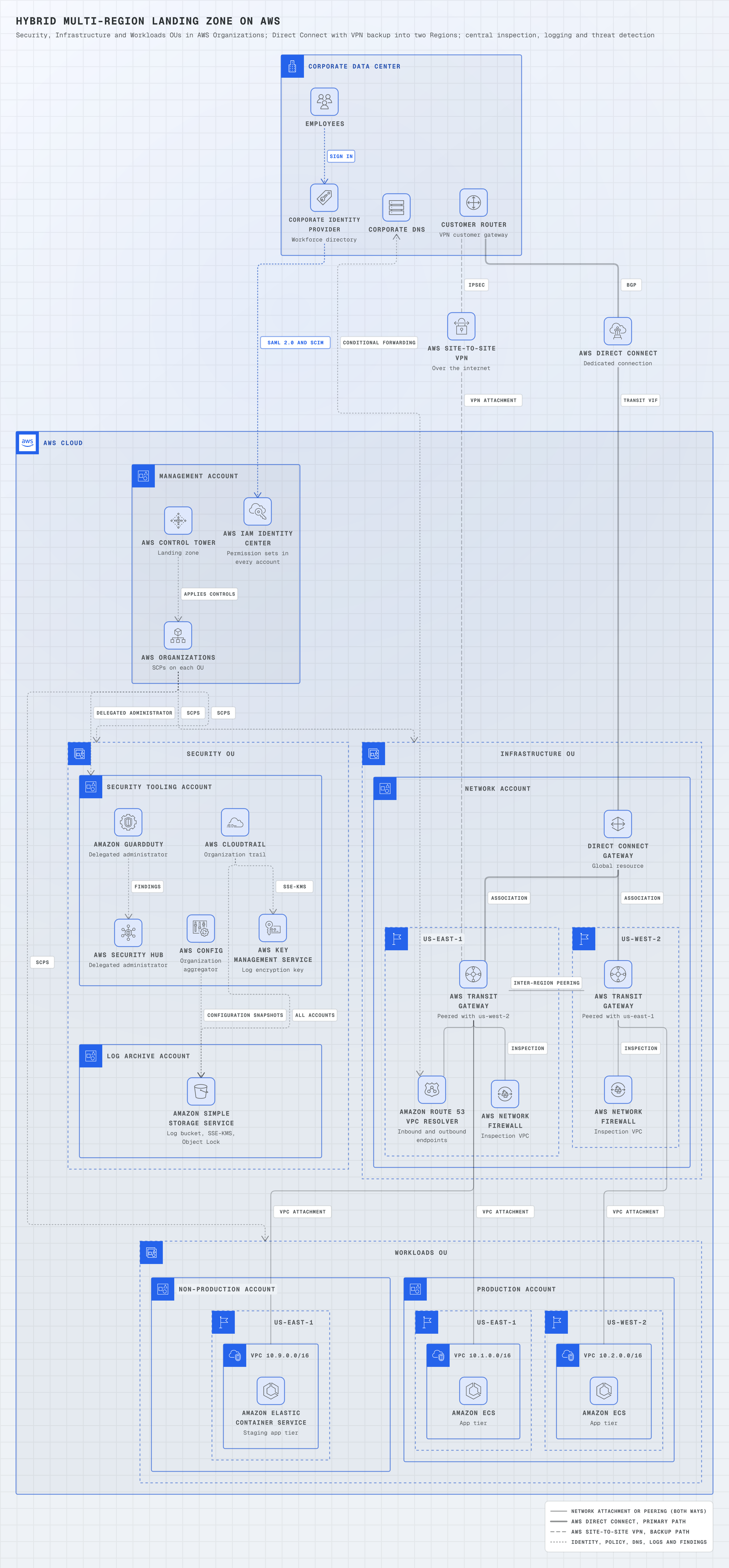
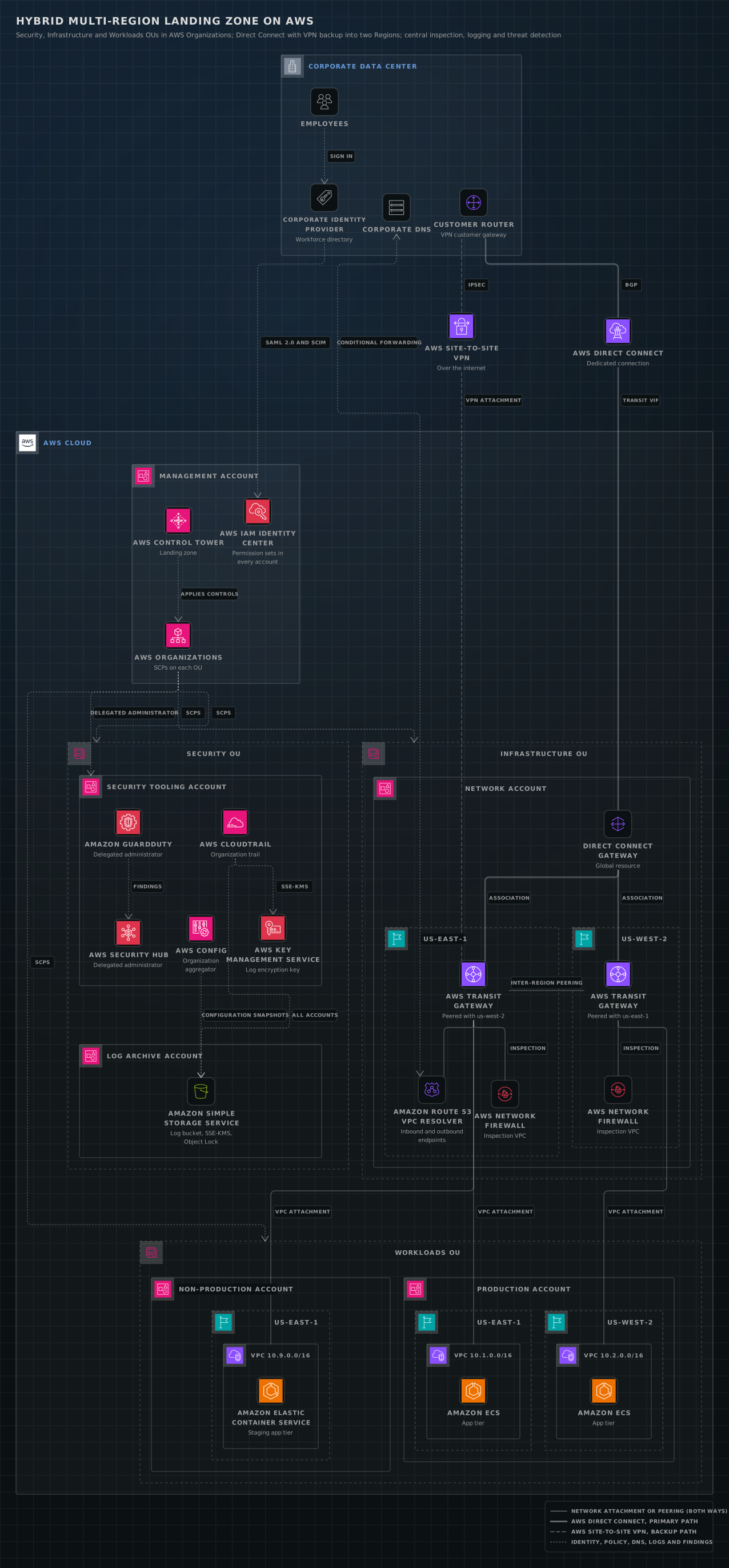
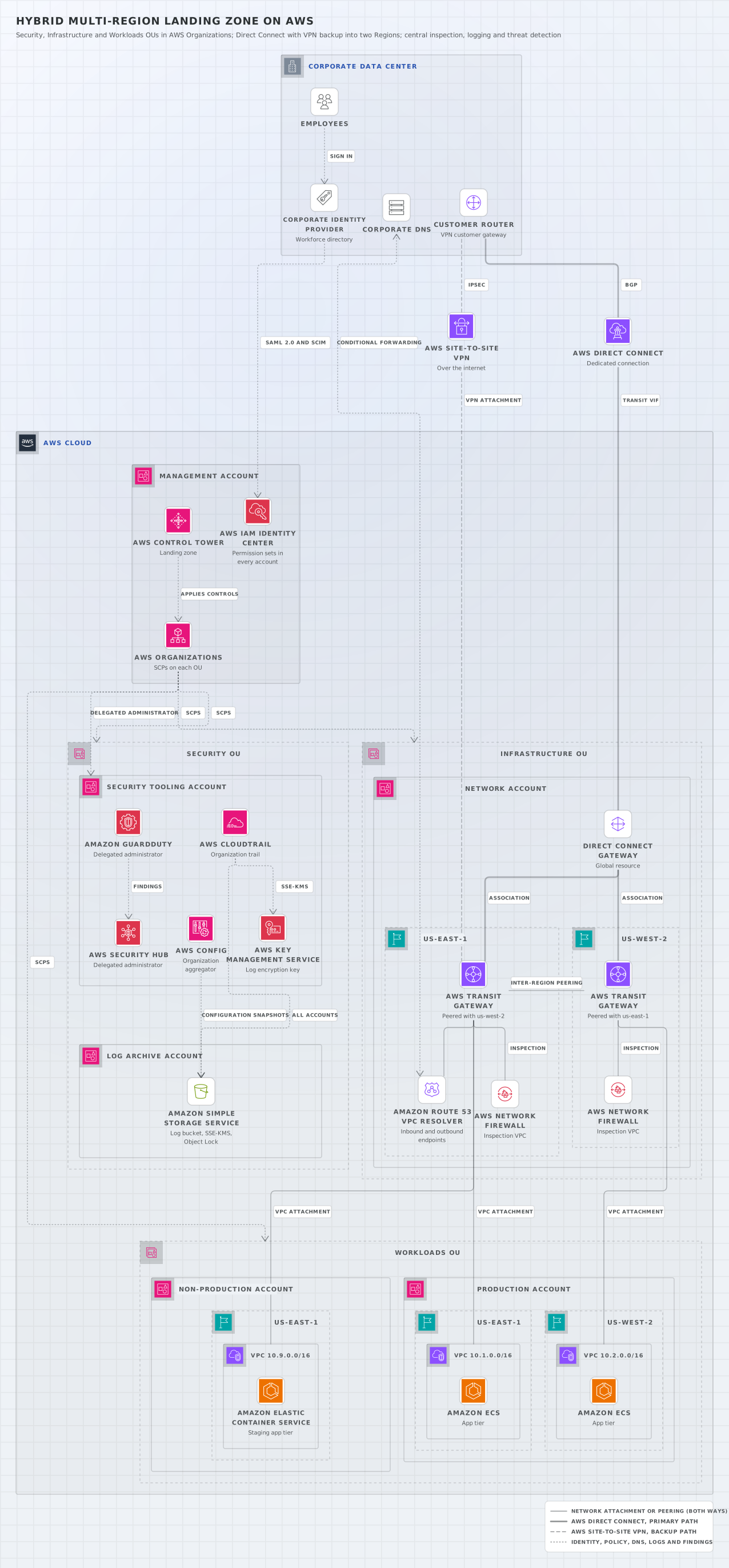
Hybrid multi-Region landing zone on AWS
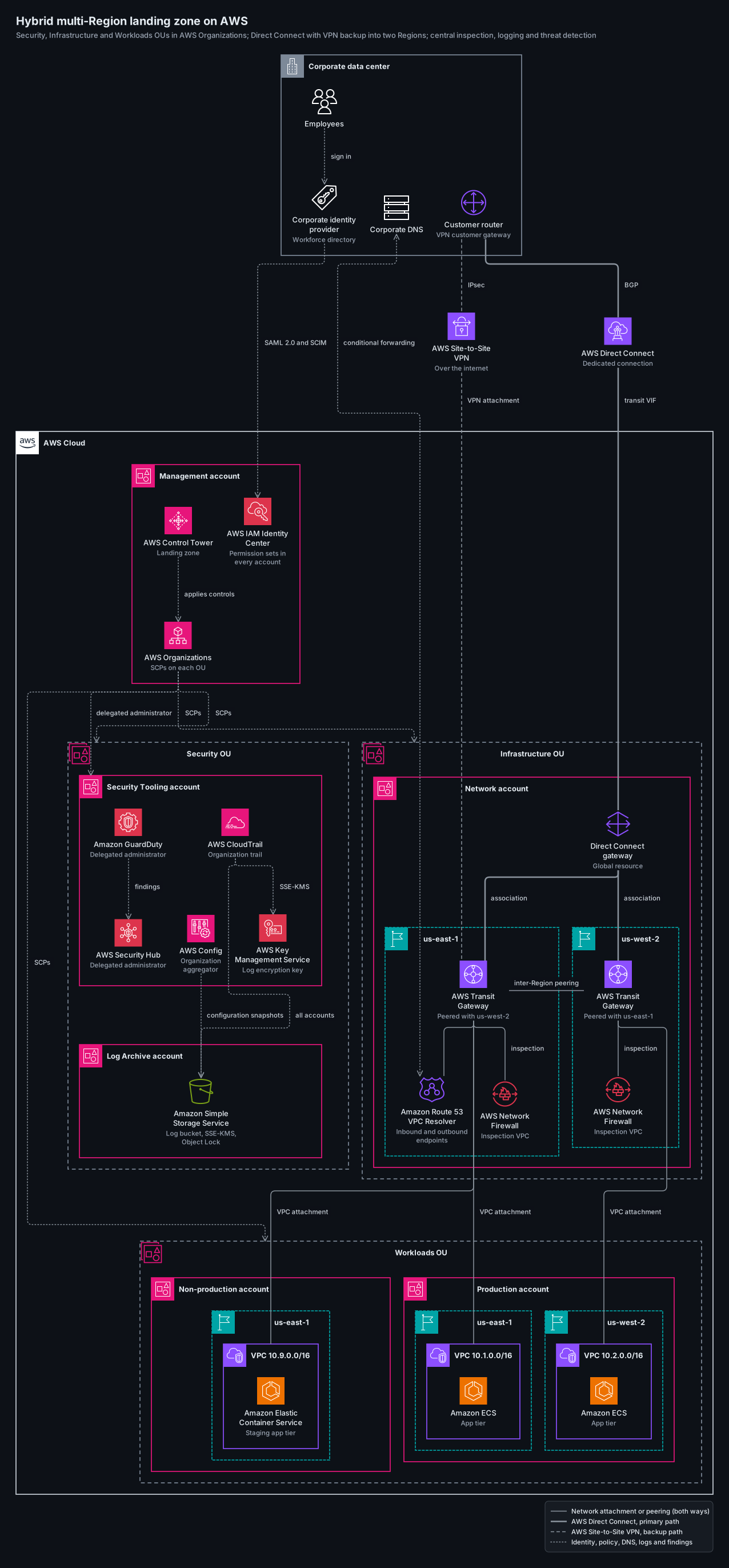
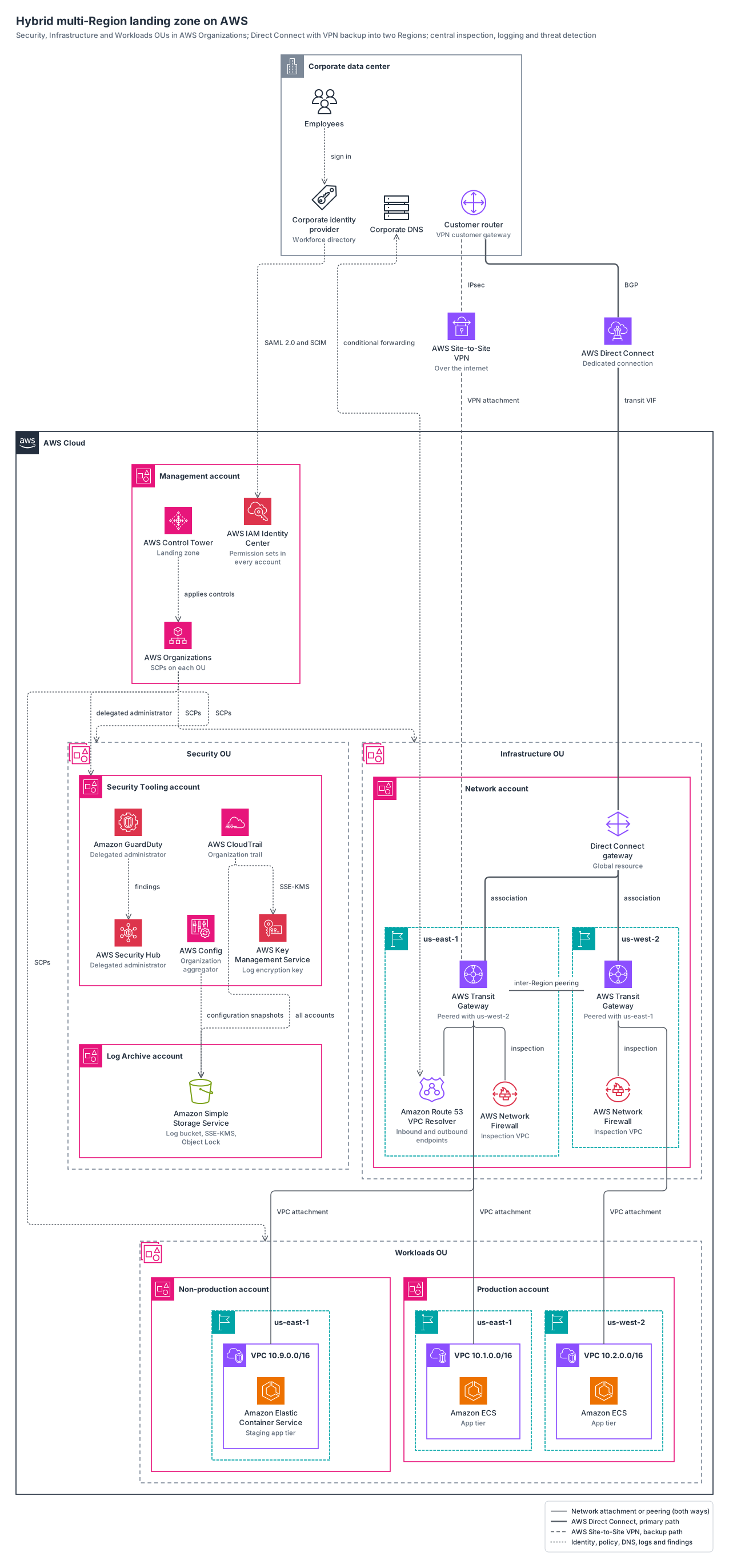
an AWS landing zone with AWS Organizations OUs for security, infrastructure and workloads, IAM Identity Center federated to a corporate IdP, central logging and threat detection, Network Firewall inspection, and a data center on Direct Connect with VPN backup reaching two Regions through peered Transit Gateways.
aws24 nodes19 groups22 edges
aws-hybrid-landing-zone.yamlOn GitHub
# yaml-language-server: $schema=../references/diagram.schema.json
title: Hybrid multi-Region landing zone on AWS
subtitle: Security, Infrastructure and Workloads OUs in AWS Organizations; Direct Connect with VPN backup into two Regions; central inspection, logging and threat detection
direction: down
layout: { spacing: 0.6 }

legend:
  solid: Network attachment or peering (both ways)
  thick: AWS Direct Connect, primary path
  dashed: AWS Site-to-Site VPN, backup path
  dotted: Identity, policy, DNS, logs and findings

groups:
  dc: { type: aws:corporate-dc, label: Corporate data center }
  cloud: { type: aws:cloud }
  # The management account sits at the organization root, outside every OU; SCPs do not apply to it.
  mgmt: { type: aws:account, label: Management account, in: cloud }
  sec-ou: { type: aws:generic-dashed, icon: aws:organizations-organizational-unit, label: Security OU, in: cloud }
  log: { type: aws:account, label: Log Archive account, in: sec-ou }
  tooling: { type: aws:account, label: Security Tooling account, in: sec-ou }
  infra-ou: { type: aws:generic-dashed, icon: aws:organizations-organizational-unit, label: Infrastructure OU, in: cloud }
  network: { type: aws:account, label: Network account, in: infra-ou }
  net-east: { type: aws:region, label: us-east-1, in: network }
  net-west: { type: aws:region, label: us-west-2, in: network }
  wl-ou: { type: aws:generic-dashed, icon: aws:organizations-organizational-unit, label: Workloads OU, in: cloud }
  nonprod: { type: aws:account, label: Non-production account, in: wl-ou }
  np-east: { type: aws:region, label: us-east-1, in: nonprod }
  np-vpc: { type: aws:vpc, label: VPC 10.9.0.0/16, in: np-east }
  prod: { type: aws:account, label: Production account, in: wl-ou }
  prod-east: { type: aws:region, label: us-east-1, in: prod }
  prod-vpc-east: { type: aws:vpc, label: VPC 10.1.0.0/16, in: prod-east }
  prod-west: { type: aws:region, label: us-west-2, in: prod }
  prod-vpc-west: { type: aws:vpc, label: VPC 10.2.0.0/16, in: prod-west }

nodes:
  staff: { icon: aws:users, label: Employees, in: dc }
  idp: { icon: aws:saml-token, label: Corporate identity provider, note: Workforce directory, in: dc }
  corp-dns: { icon: aws:servers, label: Corporate DNS, in: dc }
  router: { icon: aws:vpc-customer-gateway, label: Customer router, note: VPN customer gateway, in: dc }
  dx: { icon: aws:direct-connect, label: AWS Direct Connect, note: Dedicated connection }
  vpn: { icon: aws:site-to-site-vpn, label: AWS Site-to-Site VPN, note: Over the internet }
  ct: { icon: aws:control-tower, label: AWS Control Tower, note: Landing zone, in: mgmt }
  org: { icon: aws:organizations, label: AWS Organizations, note: SCPs on each OU, in: mgmt }
  sso: { icon: aws:iam-identity-center, label: AWS IAM Identity Center, note: Permission sets in every account, in: mgmt }
  trail: { icon: aws:cloudtrail, label: AWS CloudTrail, note: Organization trail, in: tooling }
  config: { icon: aws:config, label: AWS Config, note: Organization aggregator, in: tooling }
  guardduty: { icon: aws:guardduty, label: Amazon GuardDuty, note: Delegated administrator, in: tooling }
  hub: { icon: aws:security-hub, label: AWS Security Hub, note: Delegated administrator, in: tooling }
  kms: { icon: aws:key-management-service, label: AWS Key Management Service, note: Log encryption key, in: tooling }
  bucket: { icon: aws:simple-storage-service-bucket, label: Amazon Simple Storage Service, note: "Log bucket, SSE-KMS, Object Lock", in: log }
  # A Direct Connect gateway is a global resource: it sits in the Network account but in no Region.
  dxgw: { icon: aws:direct-connect-gateway, label: Direct Connect gateway, note: Global resource, in: network }
  tgw-east: { icon: aws:transit-gateway, label: AWS Transit Gateway, note: Peered with us-west-2, in: net-east }
  nfw-east: { icon: aws:network-firewall-endpoints, label: AWS Network Firewall, note: Inspection VPC, in: net-east }
  dns-east: { icon: aws:route-53-resolver, label: Amazon Route 53 VPC Resolver, note: Inbound and outbound endpoints, in: net-east }
  tgw-west: { icon: aws:transit-gateway, label: AWS Transit Gateway, note: Peered with us-east-1, in: net-west }
  nfw-west: { icon: aws:network-firewall-endpoints, label: AWS Network Firewall, note: Inspection VPC, in: net-west }
  app-east: { icon: aws:elastic-container-service, label: Amazon ECS, note: App tier, in: prod-vpc-east }
  app-west: { icon: aws:elastic-container-service, label: Amazon ECS, note: App tier, in: prod-vpc-west }
  app-np: { icon: aws:elastic-container-service, label: Amazon Elastic Container Service, note: Staging app tier, in: np-vpc }

edges:
  - staff ..> idp: sign in
  - idp ..> sso: SAML 2.0 and SCIM
  - router === dx: BGP
  - dx === dxgw: transit VIF
  - dxgw === tgw-east, tgw-west: association
  - router --- vpn: IPsec
  - vpn --- tgw-east: VPN attachment
  # The two Regions sit side by side; constraint: false keeps the peering link from stacking them.
  - { from: tgw-east, to: tgw-west, arrow: none, label: inter-Region peering, constraint: false }
  - tgw-east -- nfw-east: inspection
  - tgw-east -- dns-east
  - tgw-west -- nfw-west: inspection
  - tgw-east -- prod-vpc-east: VPC attachment
  - tgw-west -- prod-vpc-west: VPC attachment
  - tgw-east -- np-vpc: VPC attachment
  - corp-dns <..> dns-east: conditional forwarding
  - ct ..> org: applies controls
  - org ..> sec-ou, infra-ou, wl-ou: SCPs
  - org ..> tooling: delegated administrator
  - trail ..> bucket: all accounts
  - config ..> bucket: configuration snapshots
  - trail ..> kms: SSE-KMS
  - guardduty ..> hub: findings
Start from this one
Copies the spec to diagram.yaml, then renders every format.
$ orrery init aws-hybrid-landing-zone$ orrery render diagram.yaml -f all --theme both