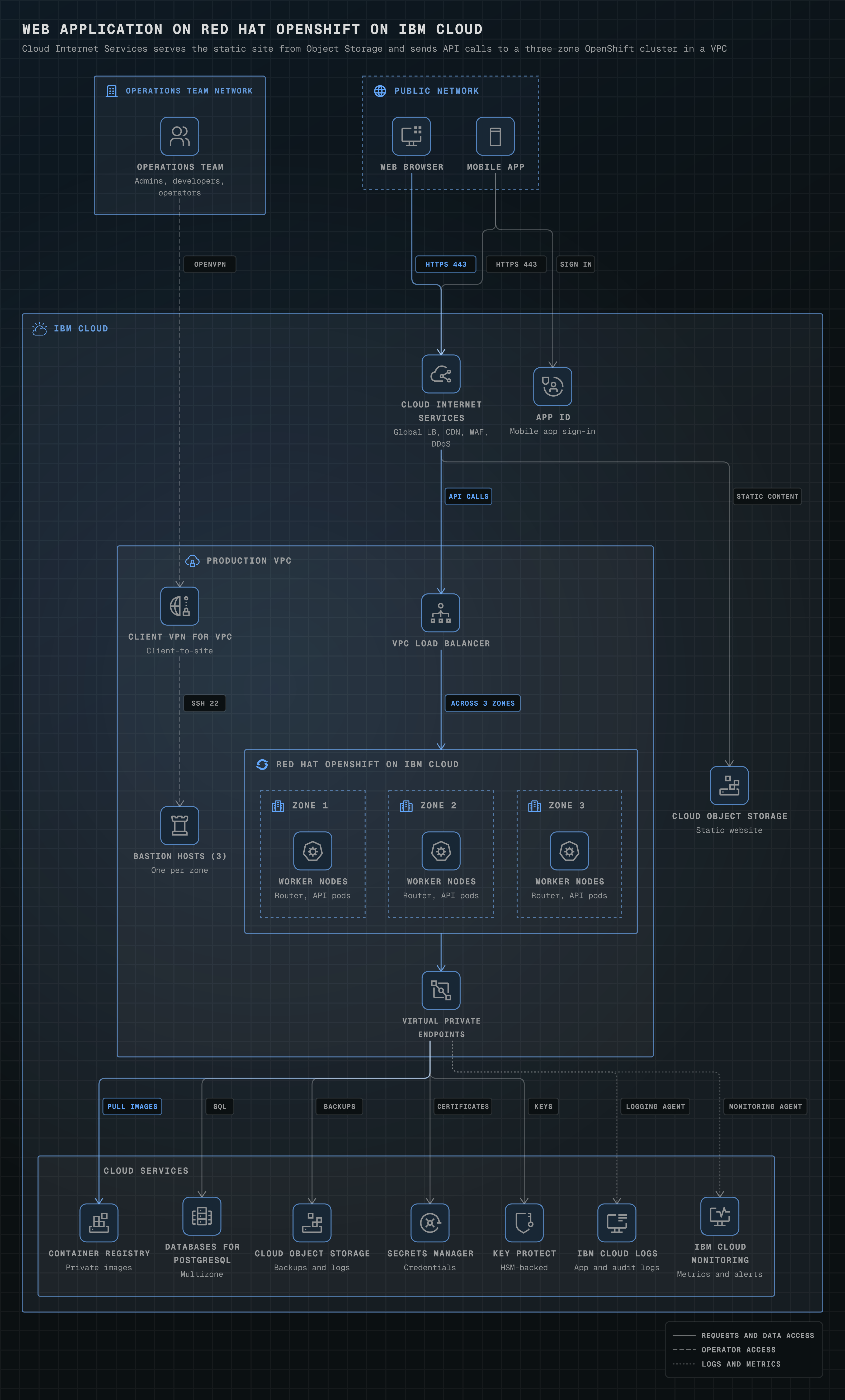
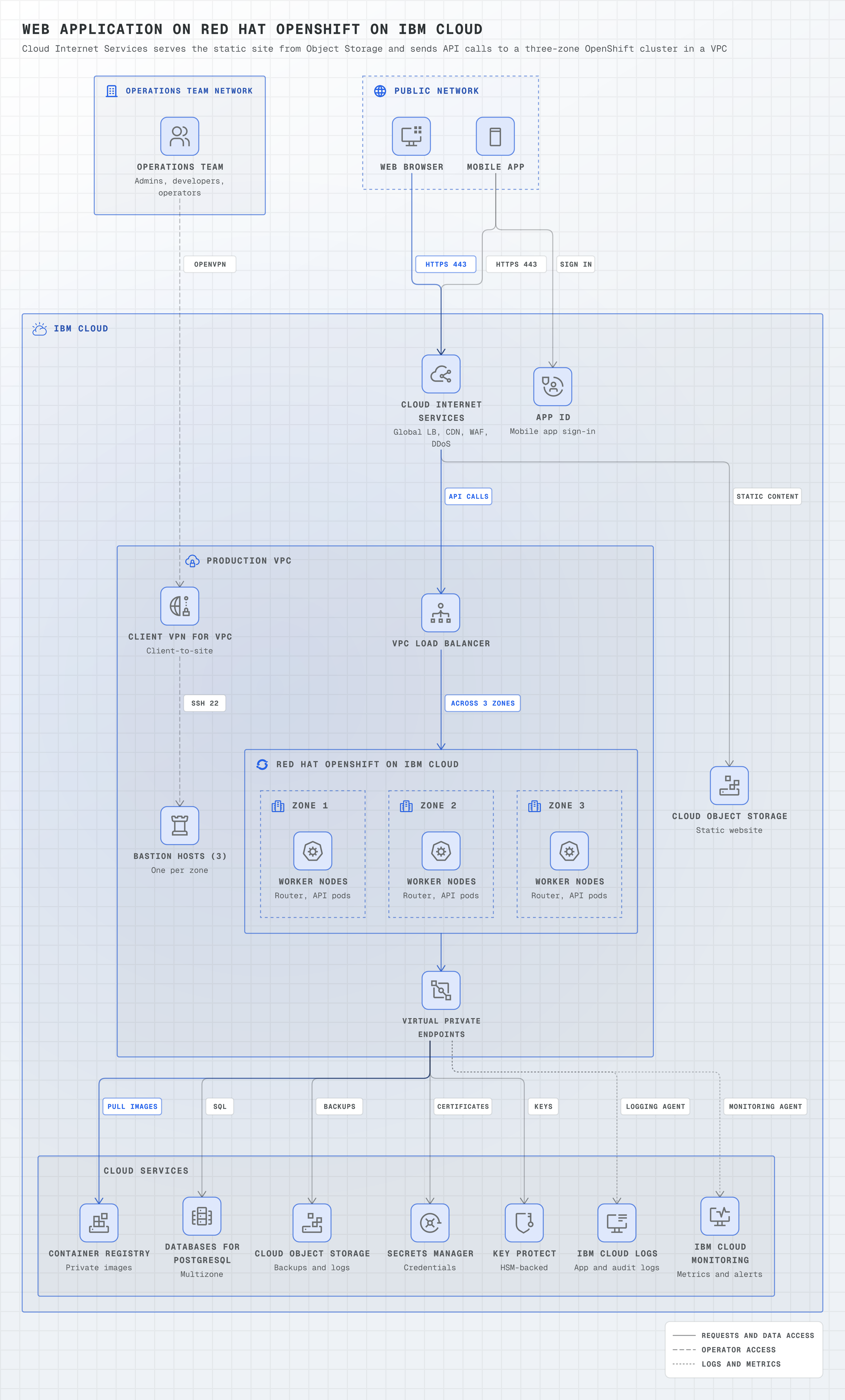
Web application on Red Hat OpenShift on IBM Cloud
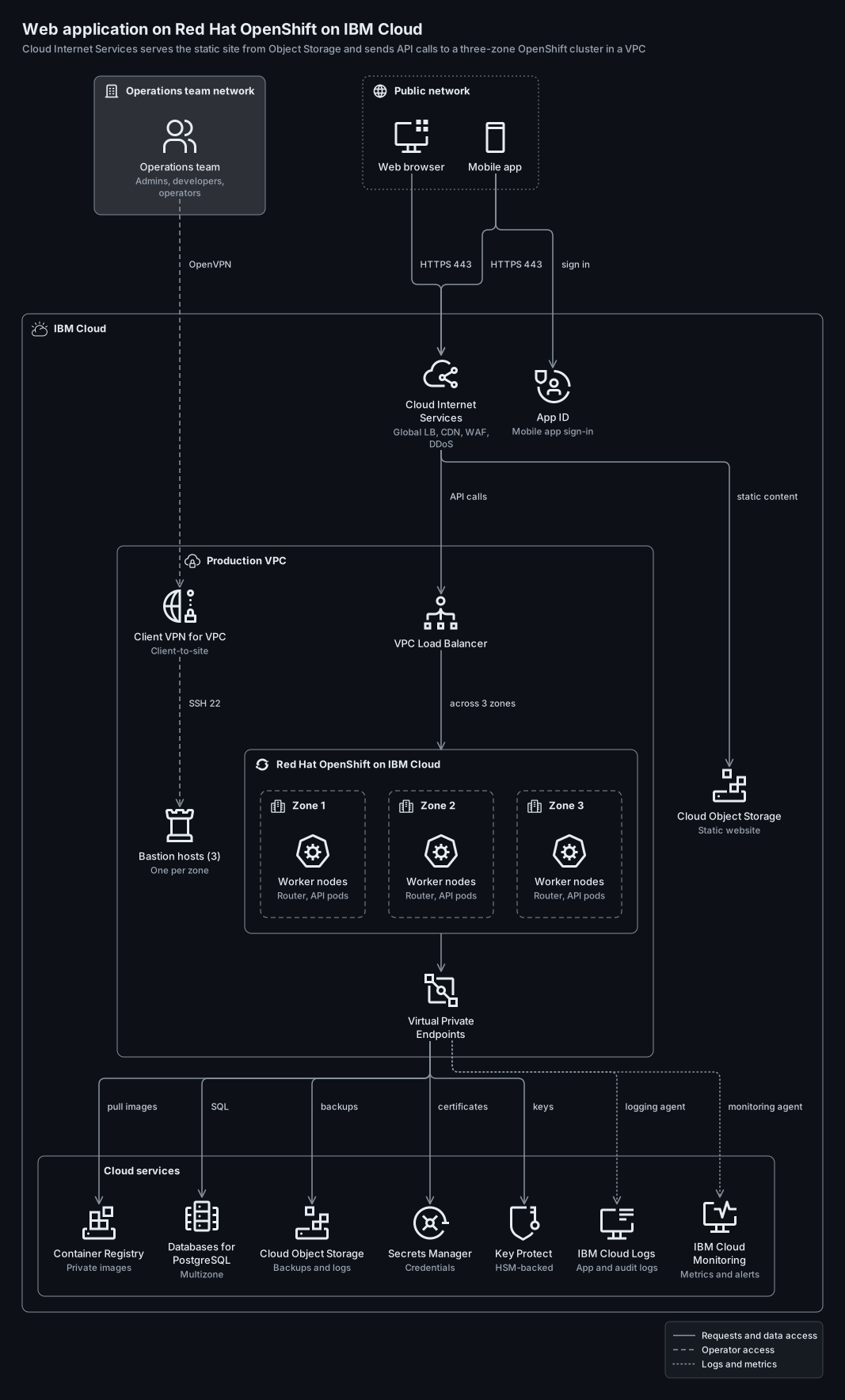
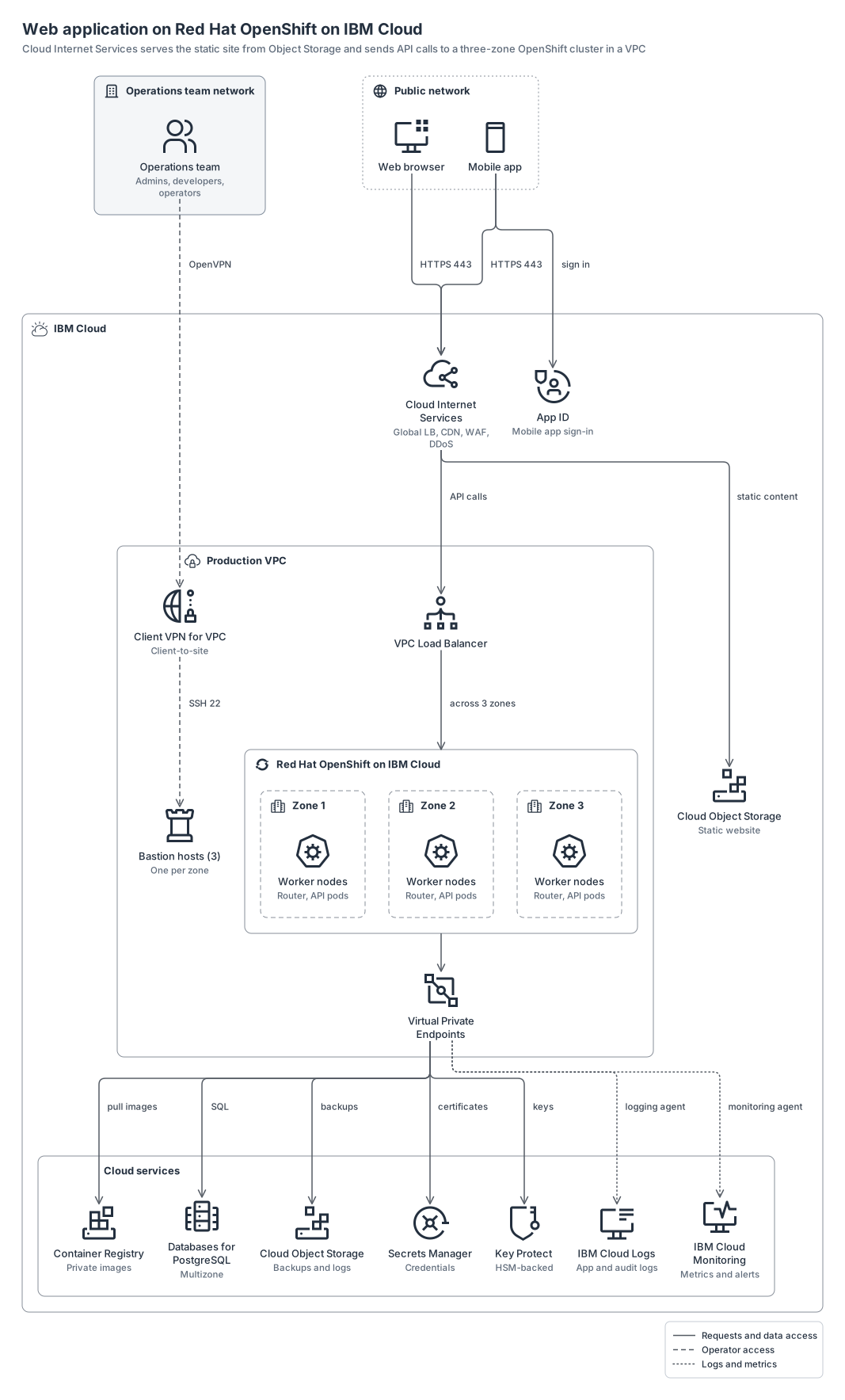
IBM Cloud Internet Services in front of a static site in Cloud Object Storage and a three-zone Red Hat OpenShift cluster, with App ID and services reached through Virtual Private Endpoints.
ibm20 nodes9 groups15 edges
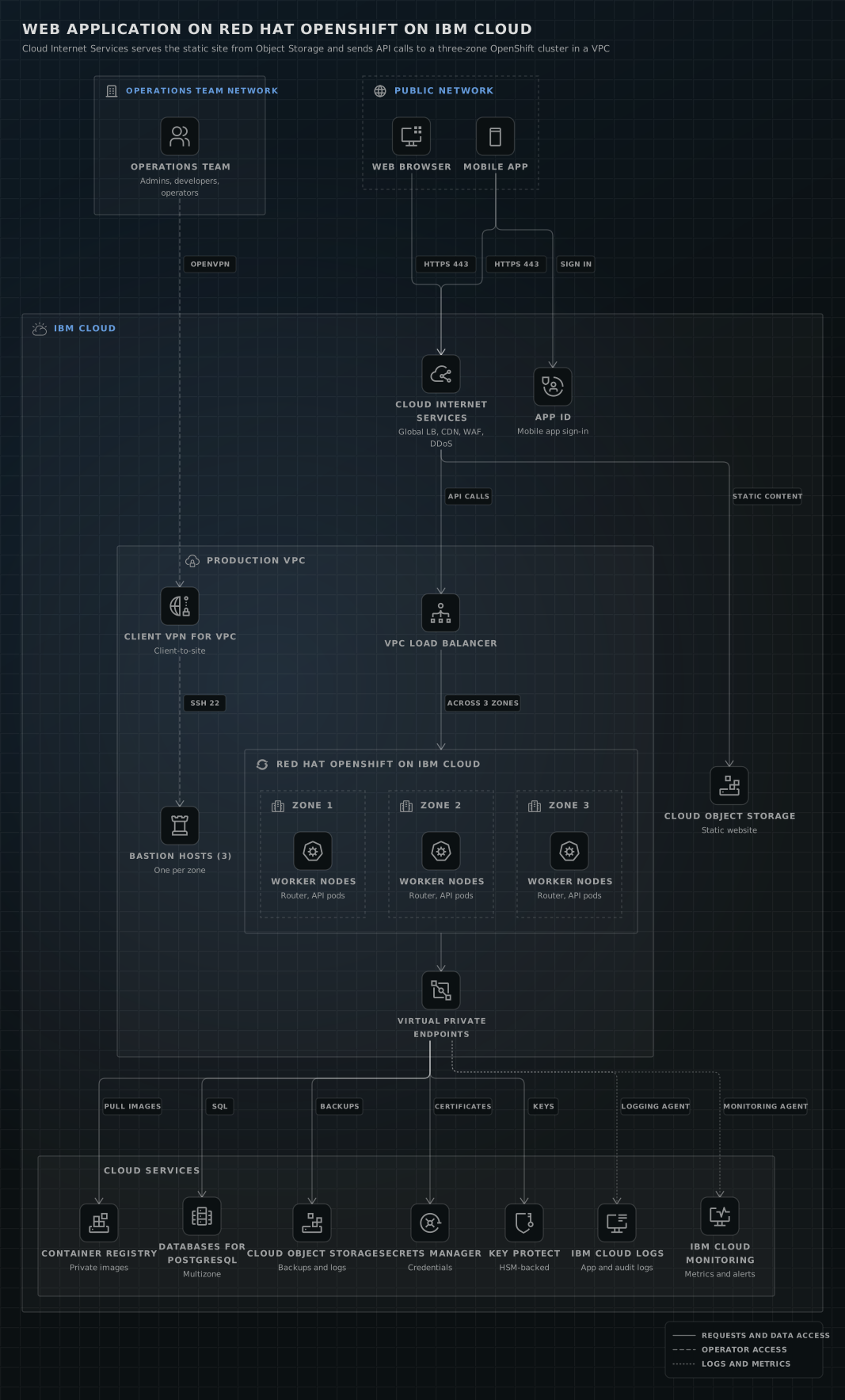
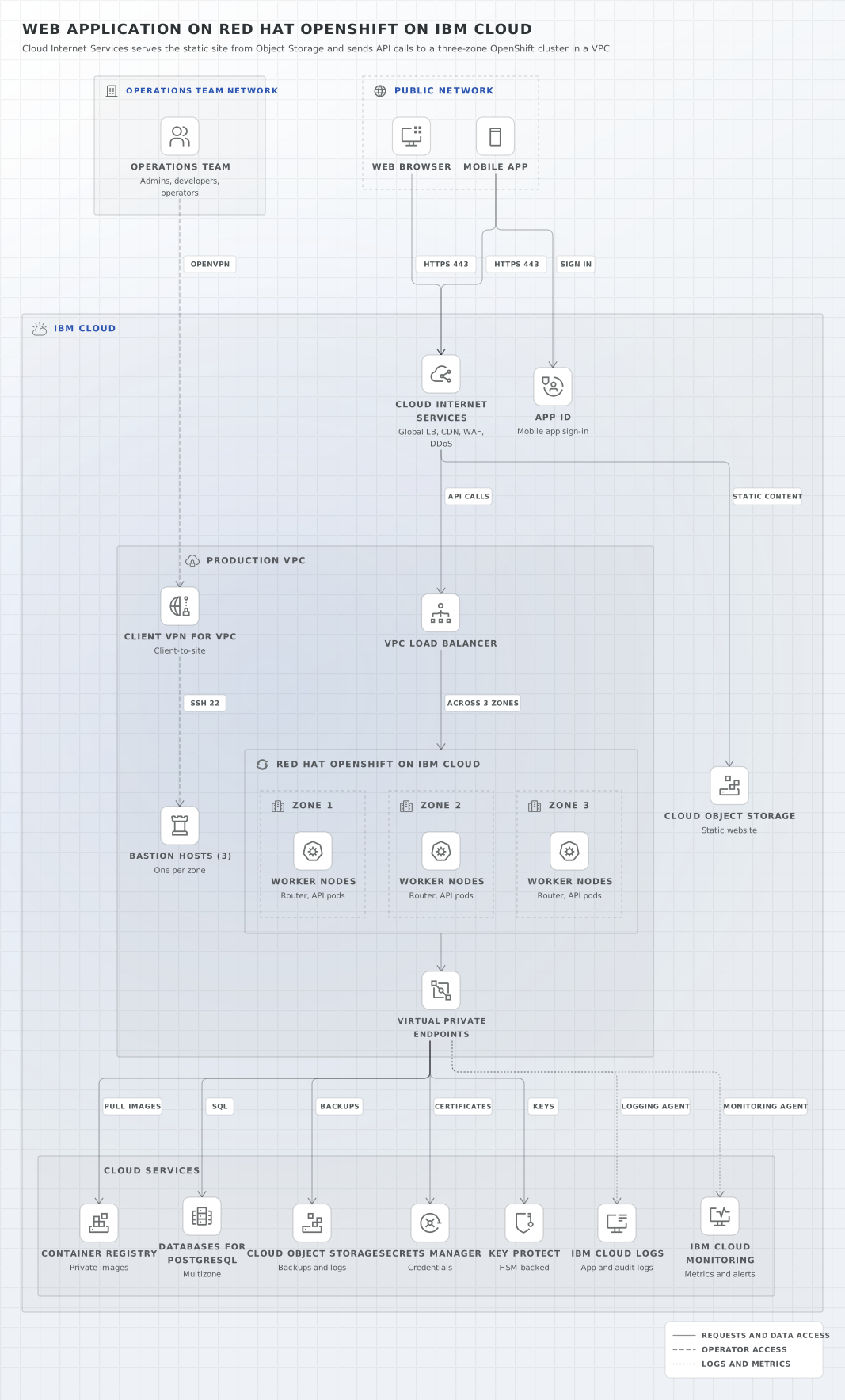
ibm-cloud-openshift.yamlOn GitHub
# yaml-language-server: $schema=../references/diagram.schema.json
title: Web application on Red Hat OpenShift on IBM Cloud
subtitle: Cloud Internet Services serves the static site from Object Storage and sends API calls to a three-zone OpenShift cluster in a VPC
direction: down
layout: { spacing: compact, layering: simplex }

# IBM's technical diagram guide asks for a legend in every diagram, so solid lines get one too.
legend:
  solid: Requests and data access
  dashed: Operator access
  dotted: Logs and metrics

# Follows IBM's "Web application on Red Hat OpenShift on VPC" pattern (IBM Cloud docs, network and
# security design). IBM product glyphs where Carbon ships one; Carbon UI glyphs for Object Storage,
# Container Registry, Cloud Logs and Monitoring, which have none.
groups:
  # orrery has no IBM group styles; IBM's guide draws groups as plain outlined boxes, so these use
  # the neutral types with Carbon icons in the headers. The nesting follows IBM's network design
  # diagram, which draws no region box: IBM Cloud > Production VPC > cluster > workers per zone.
  ops-net: { type: on-prem, label: Operations team network }
  public: { type: internet, label: Public network }
  ibmcloud: { type: box, label: IBM Cloud, icon: ibm:ibm-cloud }
  vpc: { type: box, label: Production VPC, icon: ibm:virtual-private-cloud, in: ibmcloud }
  cluster: { type: box, label: Red Hat OpenShift on IBM Cloud, icon: ibm:logo-openshift, in: vpc }
  zone-1: { type: dashed, label: Zone 1, icon: ibm:data-center, in: cluster }
  zone-2: { type: dashed, label: Zone 2, icon: ibm:data-center, in: cluster }
  zone-3: { type: dashed, label: Zone 3, icon: ibm:data-center, in: cluster }
  services: { type: box, label: Cloud services, in: ibmcloud }

nodes:
  ops: { icon: ibm:user-multiple, label: Operations team, note: "Admins, developers, operators", in: ops-net }
  web: { icon: ibm:application-web, label: Web browser, in: public }
  mobile: { icon: ibm:mobile, label: Mobile app, in: public }
  cis: { icon: ibm:ibm-cloud-internet-services, label: Cloud Internet Services, note: "Global LB, CDN, WAF, DDoS", in: ibmcloud }
  appid: { icon: ibm:ibm-cloud-app-id, label: App ID, note: Mobile app sign-in, in: ibmcloud }
  site: { icon: ibm:object-storage, label: Cloud Object Storage, note: Static website, in: ibmcloud }
  # The pattern's decision is Client VPN for VPC (OpenVPN client); operators reach the cluster
  # only through the bastion hosts, which run privileged access management software.
  vpn: { icon: ibm:ibm-cloud-vpc-client-vpn, label: Client VPN for VPC, note: Client-to-site, in: vpc }
  lb: { icon: ibm:load-balancer-vpc, label: VPC Load Balancer, in: vpc }
  bastion: { icon: ibm:bastion-host, label: Bastion hosts (3), note: One per zone, in: vpc }
  w1: { icon: ibm:kubernetes-worker-node, label: Worker nodes, note: "Router, API pods", in: zone-1 }
  w2: { icon: ibm:kubernetes-worker-node, label: Worker nodes, note: "Router, API pods", in: zone-2 }
  w3: { icon: ibm:kubernetes-worker-node, label: Worker nodes, note: "Router, API pods", in: zone-3 }
  vpe: { icon: ibm:ibm-cloud-vpc-endpoints, label: Virtual Private Endpoints, in: vpc }
  registry: { icon: ibm:container-registry, label: Container Registry, note: Private images, in: services }
  db: { icon: ibm:ibm-cloud-databases, label: Databases for PostgreSQL, note: Multizone, in: services }
  cos: { icon: ibm:object-storage, label: Cloud Object Storage, note: Backups and logs, in: services }
  secrets: { icon: ibm:ibm-cloud-secrets-manager, label: Secrets Manager, note: Credentials, in: services }
  kp: { icon: ibm:ibm-cloud-key-protect, label: Key Protect, note: HSM-backed, in: services }
  logs: { icon: ibm:cloud-logging, label: IBM Cloud Logs, note: App and audit logs, in: services }
  mon: { icon: ibm:cloud-monitoring, label: IBM Cloud Monitoring, note: Metrics and alerts, in: services }

edges:
  # Only HTTPS on port 443 passes CIS: page requests go to the static site, API calls to the VPC.
  - web, mobile -> cis: HTTPS 443
  - mobile -> appid: sign in
  - cis -> site: static content
  - cis -> lb: API calls
  - lb -> cluster: across 3 zones
  - cluster -> vpe
  - vpe -> registry: pull images
  - vpe -> db: SQL
  - vpe -> cos: backups
  - vpe -> secrets: certificates
  - vpe -> kp: keys
  # The logging and monitoring agents run on the workers and send through the endpoints.
  - vpe ..> logs: logging agent
  - vpe ..> mon: monitoring agent
  - ops --> vpn: OpenVPN
  - vpn --> bastion: SSH 22
Start from this one
Copies the spec to diagram.yaml, then renders every format.
$ orrery init ibm-cloud-openshift$ orrery render diagram.yaml -f all --theme both