Hub-spoke network on Azure
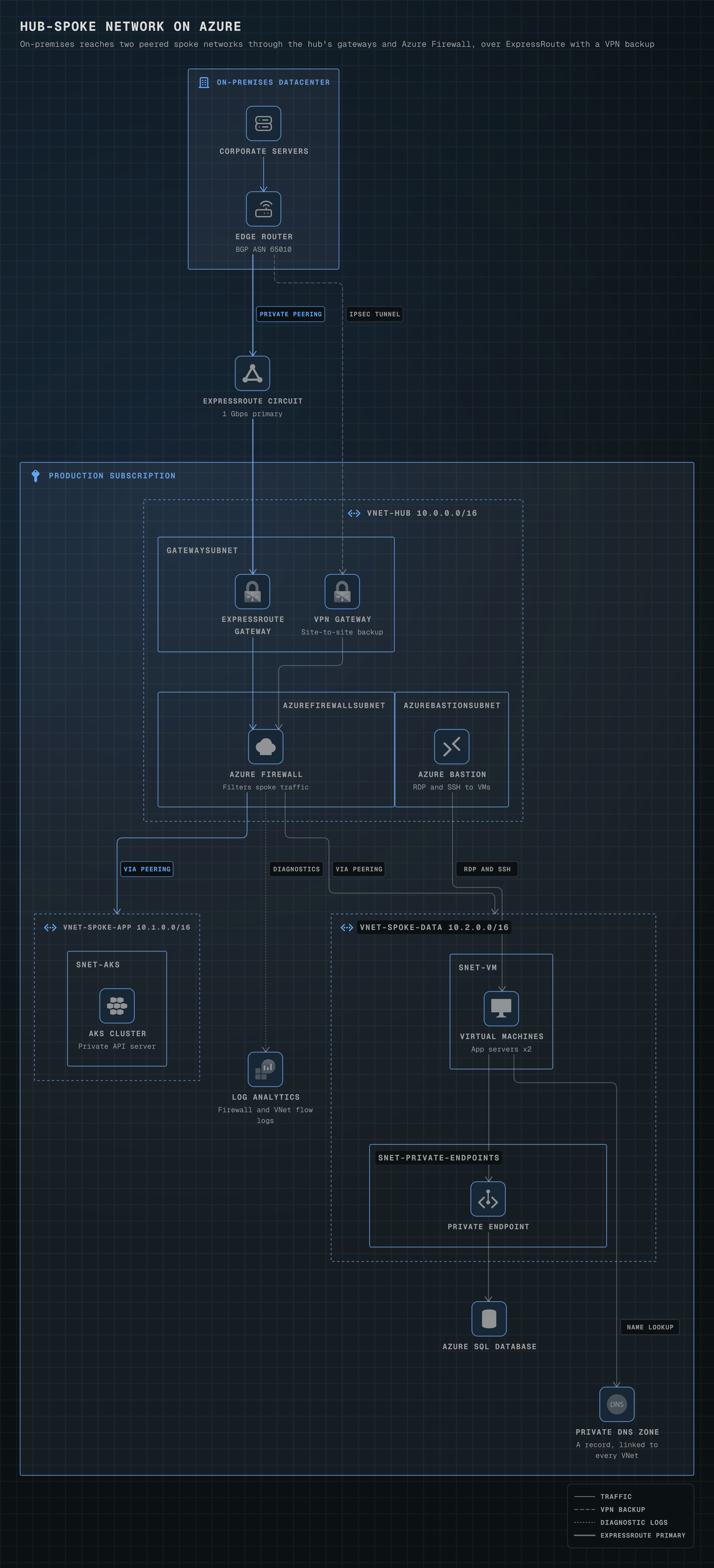
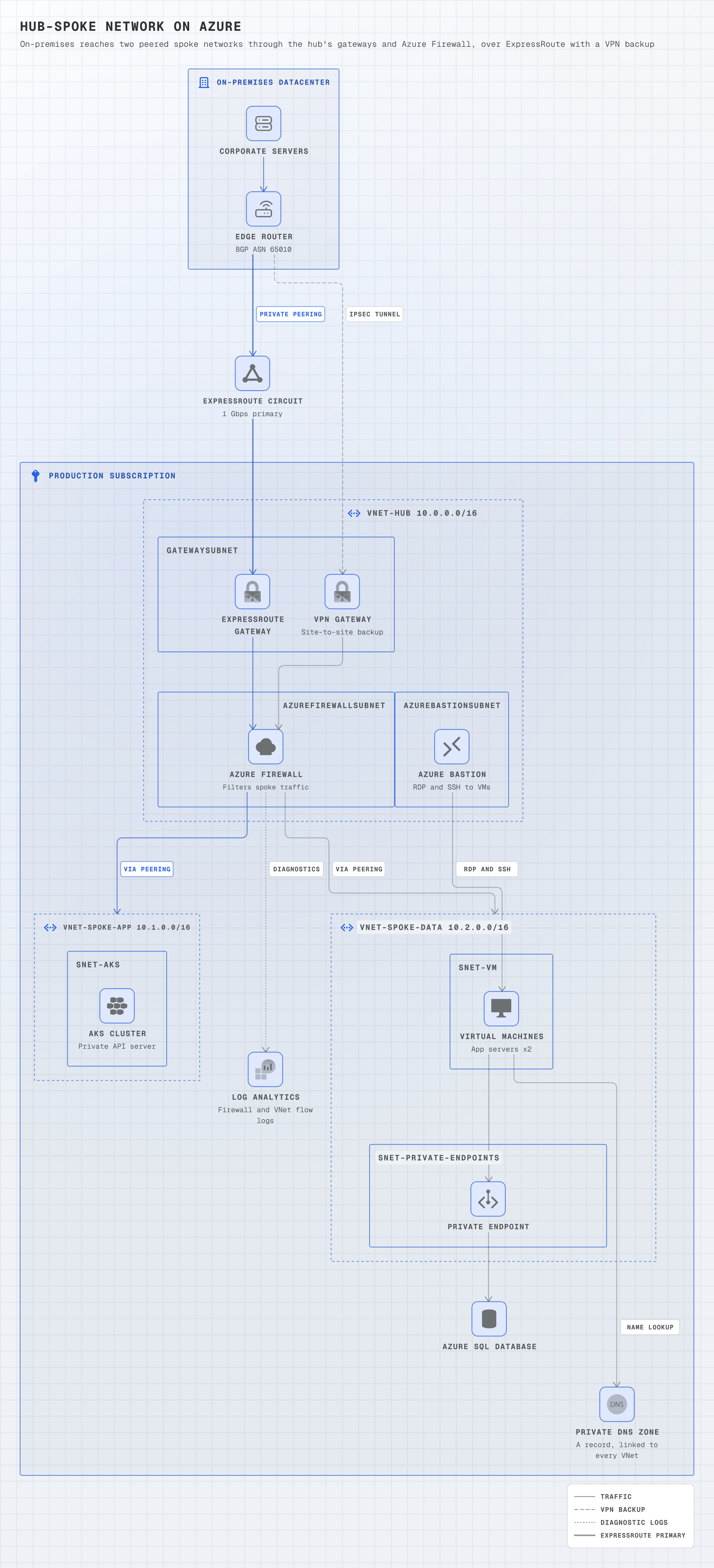
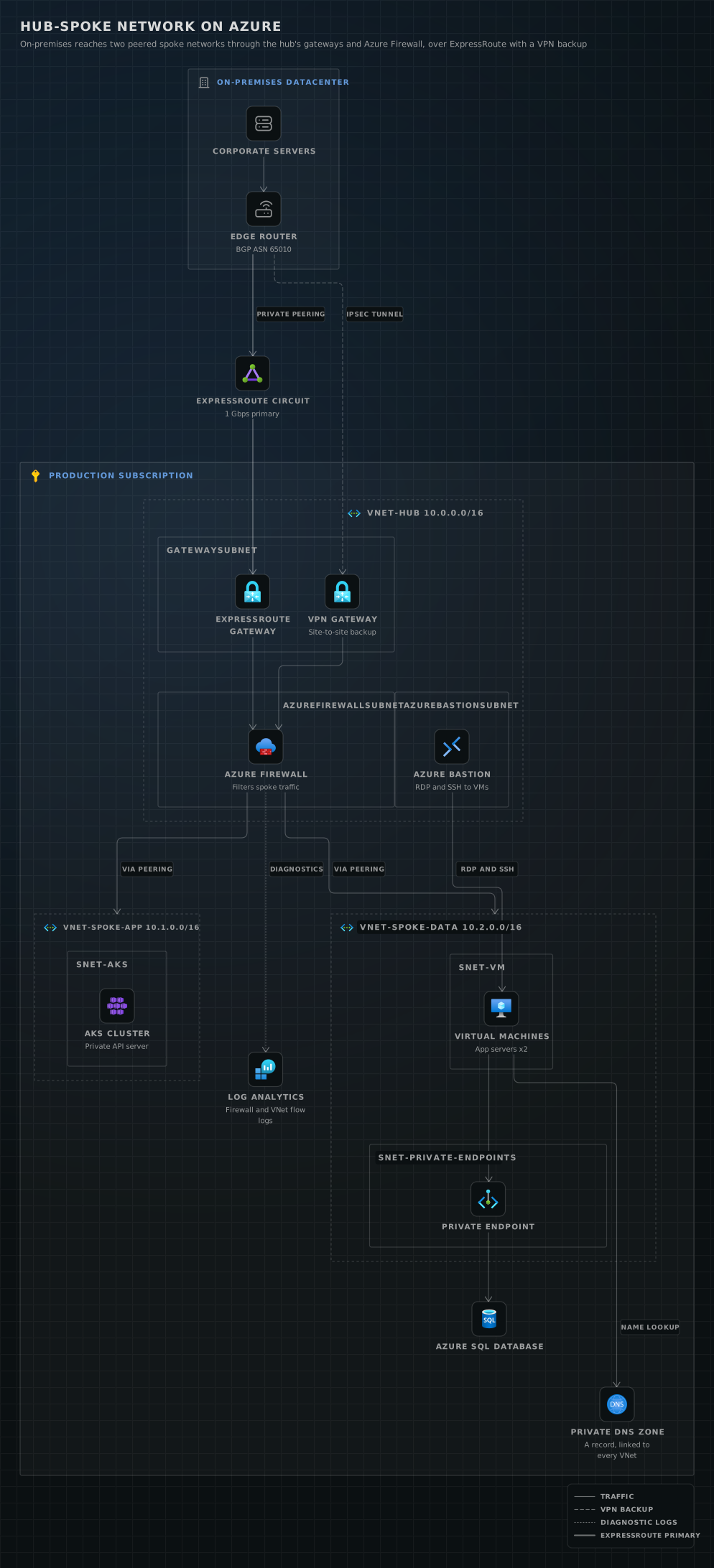
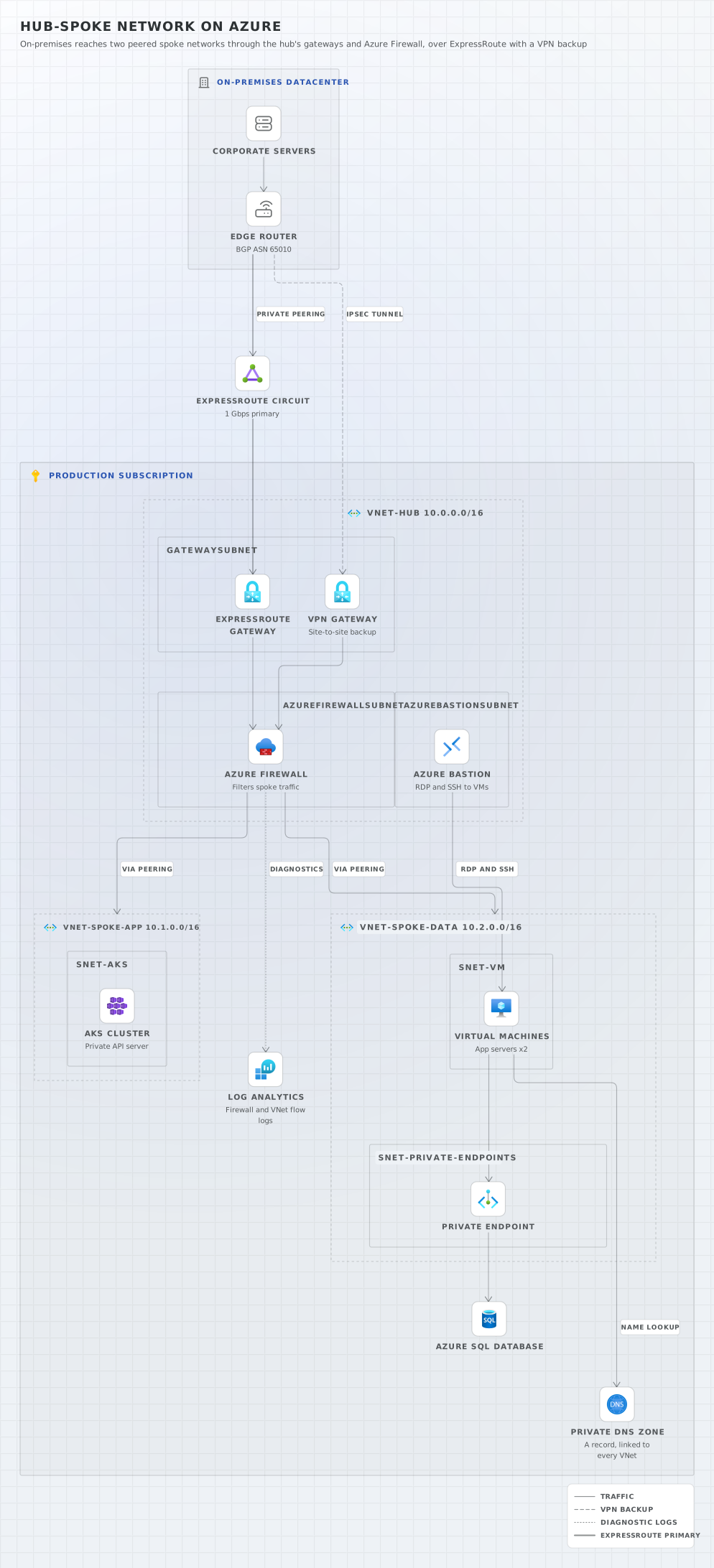
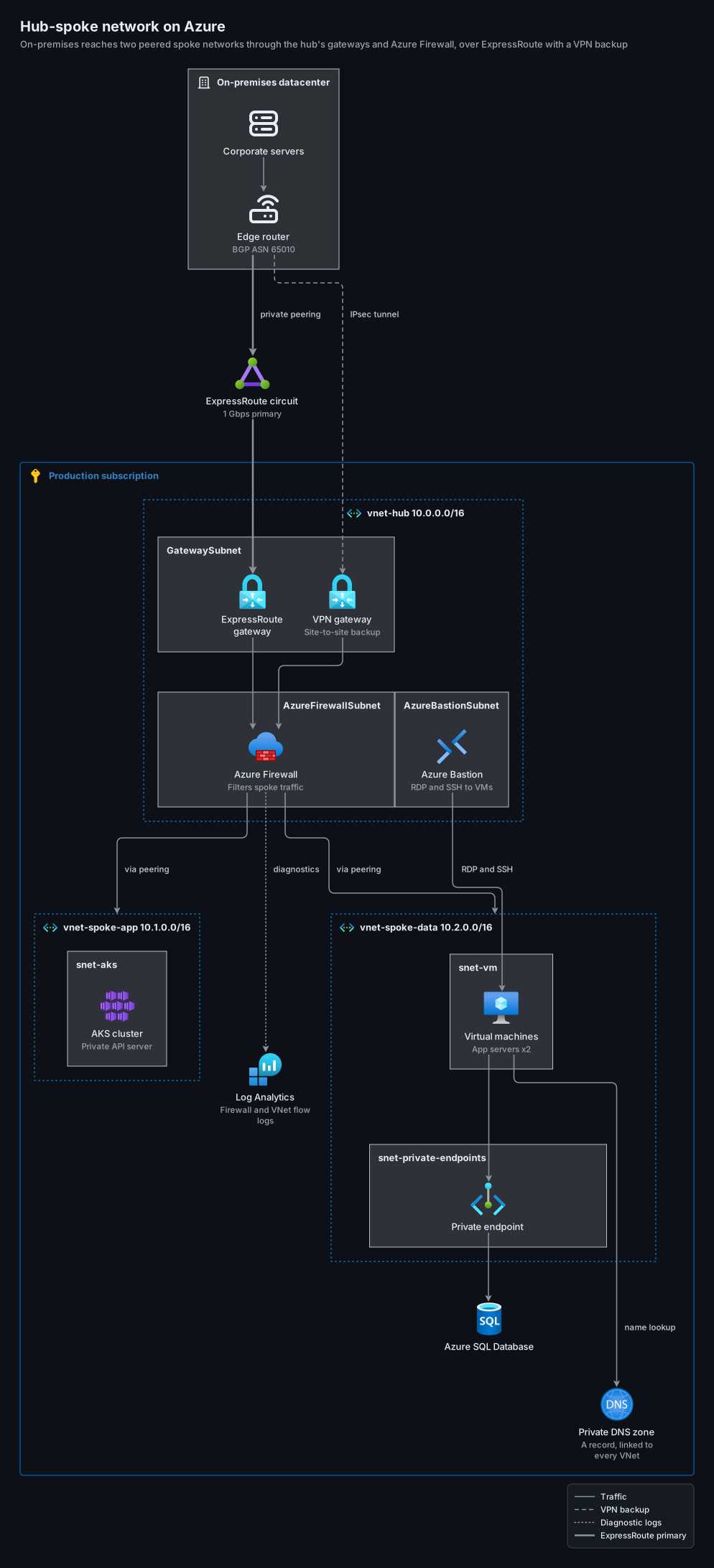
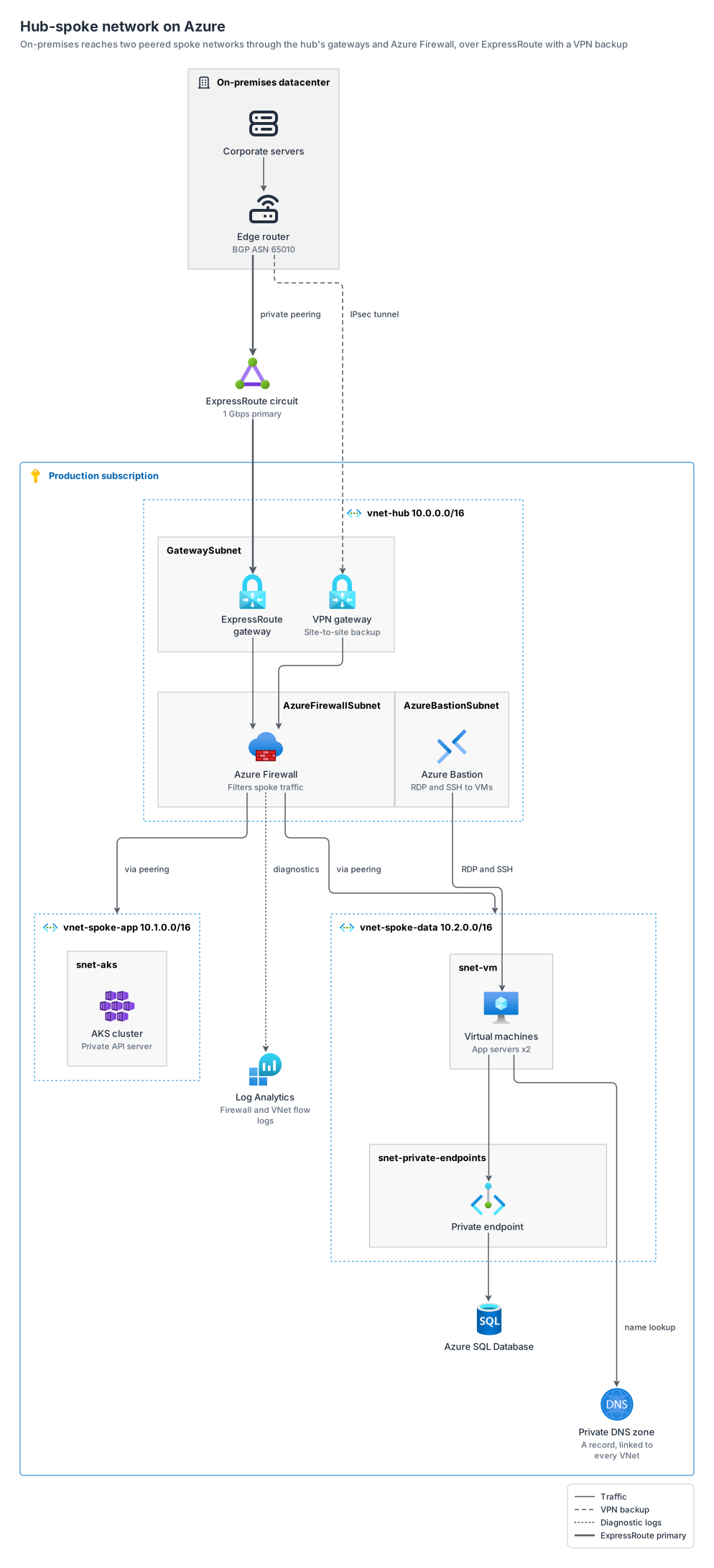
a hub-spoke network on Azure: on-premises reaches the hub's ExpressRoute and VPN gateways and Azure Firewall, which forwards over the peerings to the spokes, with Bastion in the hub, AKS in one spoke and VMs with a private endpoint to Azure SQL in the other, Private DNS and Log Analytics.
azure13 nodes11 groups11 edges
azure-hub-spoke.yamlOn GitHub
# yaml-language-server: $schema=../references/diagram.schema.json
title: Hub-spoke network on Azure
subtitle: On-premises reaches two peered spoke networks through the hub's gateways and Azure Firewall, over ExpressRoute with a VPN backup
direction: down
# Filled triangles, as in Azure's reference diagrams. One port per edge: the two lines from the
# firewall to the spokes (traffic routed over the peerings) need their own lanes.
arrowhead: filled
layout: { merge: false, spacing: compact }

legend:
  solid: Traffic
  dashed: VPN backup
  dotted: Diagnostic logs
  thick: ExpressRoute primary

groups:
  onprem: { type: azure:on-prem, label: On-premises datacenter }
  sub: { type: azure:subscription, label: Production subscription }
  hub: { type: azure:vnet-hub, label: vnet-hub 10.0.0.0/16, in: sub }
  snet-gw: { type: azure:subnet, label: GatewaySubnet, in: hub }
  snet-fw: { type: azure:subnet, label: AzureFirewallSubnet, in: hub }
  snet-bastion: { type: azure:subnet, label: AzureBastionSubnet, in: hub }
  # azure:vnet-hub is the hub-and-spoke VNet style (dashed blue), used here for the spokes too.
  spoke-app: { type: azure:vnet-hub, label: vnet-spoke-app 10.1.0.0/16, in: sub }
  snet-aks: { type: azure:subnet, label: snet-aks, in: spoke-app }
  spoke-data: { type: azure:vnet-hub, label: vnet-spoke-data 10.2.0.0/16, in: sub }
  snet-vm: { type: azure:subnet, label: snet-vm, in: spoke-data }
  snet-pe: { type: azure:subnet, label: snet-private-endpoints, in: spoke-data }

nodes:
  servers: { icon: generic:servers, label: Corporate servers, in: onprem }
  router: { icon: generic:router, label: Edge router, note: BGP ASN 65010, in: onprem }
  er: { icon: azure:expressroute, label: ExpressRoute circuit, note: 1 Gbps primary }
  er-gw: { icon: azure:vpn-gateway, label: ExpressRoute gateway, in: snet-gw }
  vpn-gw: { icon: azure:vpn-gateway, label: VPN gateway, note: Site-to-site backup, in: snet-gw }
  fw: { icon: azure:firewall, label: Azure Firewall, note: Filters spoke traffic, in: snet-fw }
  bastion: { icon: azure:bastion, label: Azure Bastion, note: RDP and SSH to VMs, in: snet-bastion }
  aks: { icon: azure:aks, label: AKS cluster, note: Private API server, in: snet-aks }
  vms: { icon: azure:vm, label: Virtual machines, note: App servers x2, in: snet-vm }
  pe: { icon: azure:private-endpoint, label: Private endpoint, in: snet-pe }
  sql: { icon: azure:sql, label: Azure SQL Database, in: sub }
  dns: { icon: azure:dns-zones, label: Private DNS zone, note: "A record, linked to every VNet", in: sub }
  logs: { icon: azure:log-analytics, label: Log Analytics, note: Firewall and VNet flow logs, in: sub }

# Arrows follow inbound traffic from on-premises through the hub to the spokes; replies take the
# same links. Microsoft's diagram guidance asks for arrows and against bidirectional ones.
edges:
  - servers -> router
  - router ==> er: private peering
  - er ==> er-gw
  - router --> vpn-gw: IPsec tunnel
  - er-gw, vpn-gw -> fw
  - fw -> spoke-app: via peering
  - fw -> spoke-data: via peering
  - bastion -> vms: RDP and SSH
  - fw ..> logs: diagnostics
  - vms -> pe -> sql
  - vms -> dns: name lookup
Start from this one
Copies the spec to diagram.yaml, then renders every format.
$ orrery init azure-hub-spoke$ orrery render diagram.yaml -f all --theme both